

By Josh Cottrell, Solution Developer at TrueNorth IT.
A lot of the work on a Dynamics 365 system happens after it goes live: a report that needs another column; a form that needs a new field; a dashboard that needs a new section. It’s part of the partnerships we form with our clients.
That kind of work doesn’t sit in the two-week sprints that we use for larger projects. It turns up in ones and twos, it’s often wanted yesterday, and it’s spread across lots of clients at once. At TrueNorth, it’s handled by our Business As Usual (BAU) team, and for a while it was harder to keep on top of all the requests than it should have been.
Each piece of work lived in its own client’s project in Azure DevOps. That’s the right place for it to belong, but it meant that our developers and consultants had to switch from one project to another just to see what needed doing. It slowed everyone down, and some jobs waited longer than they would otherwise have done.
One board for everything
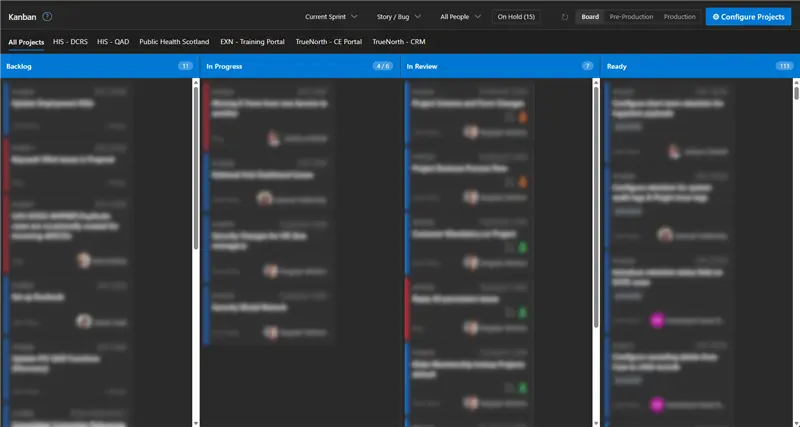
So I decided to build us something better. It’s an extension for Azure DevOps that pulls all of the BAU team’s work onto a single Kanban board, whichever client project it belongs to.
Each item still sits in its own project, so nothing gets mixed up between clients. What’s changed is that we can now see and manage everything in one place. In this image, you can see the board with every client’s BAU work on one screen:
How a job moves across the board
Every piece of work travels left to right through four columns:
- Everything waiting to be done. A developer takes the top item and assigns it to themselves.
- In Progress. The work is being done.
- In Review. A second person reviews the code and tests the change. Each card has two buttons, one for reviewed and one for tested, and both have to turn green.
- Reviewed, tested and waiting to be released.
That third column is the one I’d point to if you asked which is the most significant part of the board. Nothing reaches Ready until it’s been tested.
Keeping priorities straight
Our project team decides which projects should be on the board and which are prioritised. When new work arrives or a batch is finished, projects can be added or taken off, and the order shifts to match each client’s requirements at the time.
New requests are entered from the same screen, straight into the right client’s project. Nothing has to be copied from one place to another, so nothing is lost.
Releases made simple
Releasing every change on its own can be disruptive. On the other hand, saving everything up for one big release defeats the point of the exercise.
The board handles this with milestones. A milestone groups together related changes that can be released at the same time. Each one records the target date and the deployment steps, captured when the work is done rather than pieced together afterwards.
There are two release views: Production and Pre-Production. Pre-Production is where changes go through user acceptance testing, and anything that turns up there goes back on the board to be sorted.
Six months on
We started using the board six months ago, with a sizeable backlog spread across several projects. New work has kept coming in since then, and that backlog is now almost cleared.
Jobs are completed faster too. On all four client projects that we measured, the average time to complete a job has decreased. On the project with the biggest backlog, it’s gone from 81 days to 13. And releases are easier, because every task is written down in one place.
What does it mean if you work with us?
If you’re wondering what life looks like after a project’s gone live, this is just one example of how we continue to work with you. Your small requests sit on a board that our whole team can see, in an order that we’ve agreed with you, rather than in a queue that nobody’s looking at regularly. Every change is reviewed and tested by a second person before it’s released. And if the developer who made your change is on holiday, someone else can still release it, because the steps are written down rather than kept in their head.
It’s nothing fancy: a board, four columns and some discipline. But it’s the kind of thing that makes sure that your system keeps getting better after go-live.
If your system has started collecting a random list of to-dos, or you’d like to know how support works with us, just get in touch.